Let's understand Zscaler ZPA (Zscaler Private Access) in basic terms.
1. What is ZPA (Zscaler Private Access)?
ZPA is a Zscaler service that helps your users who are remote, or who have Zscaler ZPA on their machine, access your private applications deployed in data centres, branches or the cloud.
You may say other VPNs also do the same thing, so how is Zscaler ZPA different? The answer is that it works on a zero trust architecture. If I make you understand in layman's terms: whatever private resource a user tries to access, they first have to authenticate with Zscaler ZPA. Then, based on your config, the application details are downloaded to the user's machine. If you haven't allowed an application for those users and a user tries to access it, it is blocked directly at the machine level.
One more feature: server IPs are never exposed to the user's machine.
2. Why is ZPA better than other products in the market?
It works under the zero trust umbrella, and it's far ahead because of its variety of features. My favourite is that you can access your RDP/SSH machines with zero trust, without installing any agent on the machine, via the browser from any machine, but with full security and control. You can even record the session, or an admin can directly join the session, plus conditional access and many more features, with file transfer controls.
Others are robust browser access, full ZPA (C2C/S2C/C2S), microsegmentation and many more. You name it, it has it.
That's what makes ZPA far ahead of other products in the market.
3. How does ZPA work? The components
First, let's know what components are involved and what each one does, in basic terms.
ZCC (Zscaler Client Connector)
Zscaler provides an agent named ZCC to install on the user's machine. It also provides security to the machine with other features, but here we are mainly talking about ZPA.
Service Edge (Broker in Zscaler terms)
These are also called Public Service Edges, and they are hosted in the Zscaler cloud. This is where the user initially makes the connection to ZPA to access private applications. We will understand in depth how the user makes this connection below in this article.
Private Service Edge (Private Broker)
Instead of the public broker, the customer can use a PSE (Private Service Edge / Private Broker). This helps where the customer has users and applications in the same area, or an office location where the customer doesn't want to send traffic to the Zscaler public broker. Then the customer can consider deploying a Private Service Edge (PSE).
App Connector
A component that is installed in the customer's DC or branch where the customer's application lives. It is not necessary to install it exactly where the application lives, but wherever it is installed, make sure the App Connector has reachability to the application's listening ports.
Remember: the App Connector always initiates an outbound connection to the ZPA brokers, both public and private.
Note: when we deploy a Private Broker or an App Connector, both initiate a control channel to the ZPA cloud to learn the config.
4. How does a user access a private application with ZPA? (Example)
Now that we understand the components involved, let's take an example of how a user accesses a private application.
- User A ID: abc@example.com
- Applications the customer configured on the ZPA admin portal: example.com on TCP ports 443 and 80, and another application, abc.com, on TCP ports 443 and 80.
- Customer requirement: User A can only access the example.com application.
What does the customer do? They create a config called CFP (Client Forwarding Policy) for this user and application. CFP is the brain on the ZPA side: it makes the decision about which user gets which application info, and which does not.
As mentioned above, only the applications decided by policy are downloaded to the user's machine. Traffic that is not configured is dropped at the machine level and never reaches your ZPA cloud.
So now the user uses their credentials to log in to the ZCC agent on their machine. ZCC does the authentication and then connects to the BROKER.
Then User A tries to access the application abc.com. But for this application the user is not configured in the CFP policy, so this traffic is dropped on the user's machine.
Then User A tries to access the application example.com. There is an entry on the user's machine to forward this request to the ZPA broker. The broker receives that traffic. In the ZPA cloud there are other components, and the broker asks them which App Connector can make a connection to it, a kind of TLS tunnel.
The ZPA cloud components check the config to find which App Connector the customer has configured with the application. Then the ZPA cloud tells the App Connector, via the control channel: there is a user trying to access this application, example.com, can you reach it?
If the App Connector says yes, the ZPA cloud sends the broker info (the broker the user is connected to) to the App Connector, so it can create a data channel with this broker (a TLS connection).
Since the broker now knows, via the ZPA cloud, which App Connector is coming to it, it accepts the App Connector's connection and stitches the tunnel from the USER to the App Connector. Inside it there is one more tunnel, called a microtunnel, which goes from the user to the application server. So even Zscaler ZPA cannot see what is inside it.
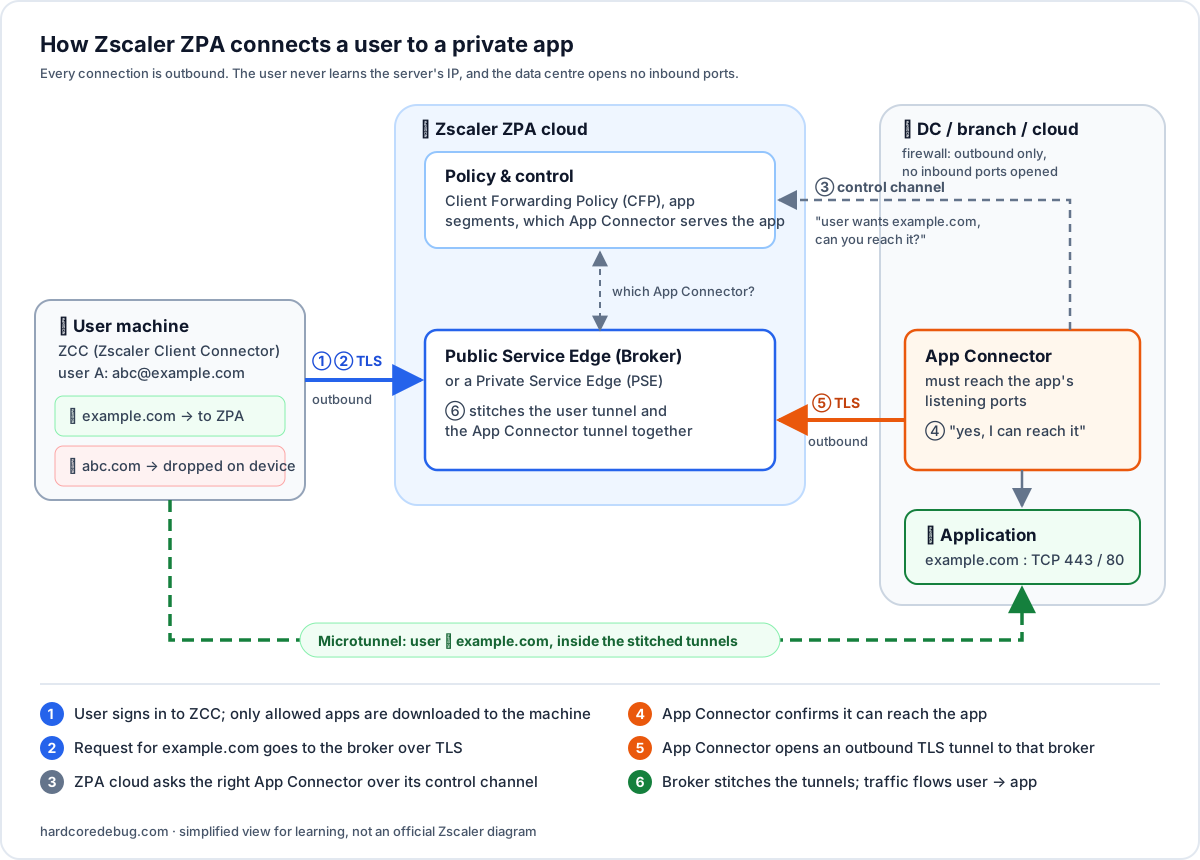 Figure 1 – How Zscaler ZPA connects User A to example.com: both sides connect outbound, the broker stitches the tunnels, and abc.com is dropped on the user's machine.
The Customer can also control traffic even it allowed via CFP but it can be controlled via Access Policy in cloud once it reaches there , based on Postures/type/location .ect.
Summary
So this is the overview of Zscaler ZPA and, in basic terms, how it works. You will get more idea when you configure it and do hands-on. I will also be publishing config articles, like my earlier one on configuring an IPsec tunnel between Palo Alto and Zscaler ZIA.
Please note these are my personal points of view and do not represent Zscaler or any other company. It's always best to check the vendor-specific articles, such as the Zscaler ZPA help documentation.
I hope this helps. Stay blessed, thank you.
Comments
No comments yet. Share your own debugging war story.